
Extract music from a YouTube or TikTok video: MP3 or split stems
Get music out of a YouTube or TikTok video: paste a link for an MP3, or split the vocal from the beat right inside the video, no software install.
Do you need the whole track, or just the beat or vocal?
Extracting music from a video covers two different needs, and each one takes a different path. If you just want the whole track as an audio file to listen to offline or keep, the job is pulling the audio out of the video, nothing more. If you need the vocal and the instrumental split apart, for karaoke or to lift a beat, that is a deeper step that comes after you already have the audio.
Both are doable right on tachnhac.com, and in both cases you never have to download the video to your device first: pasting the link is enough. The sections below follow the order you will actually need: getting an MP3 from a link, getting one from a video file you already have, then separating vocals from the music and trimming a ringtone.
How do you get an MP3 from a YouTube or TikTok link?
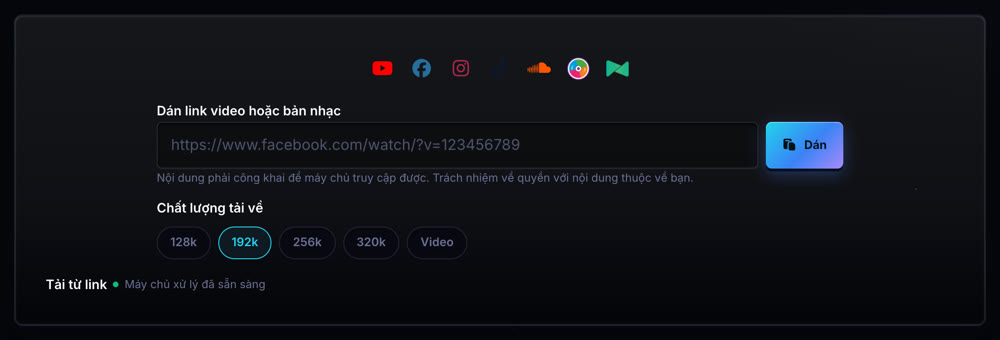
Paste the video link into the link downloader, and the server fetches the video and returns its audio track. Your browser never does the fetching. The tool accepts links from 7 platforms: YouTube, Facebook, Instagram, TikTok, SoundCloud, ZingMP3 and Nhac.vn, so turning a TikTok clip or a YouTube video into MP3 goes through the exact same flow, with no platform-specific step.
Before fetching, you pick one of four audio quality tiers (128k, 192k, 256k, 320k) or a tier that keeps the picture too. Once the fetch finishes, the page shows a preview right there, with a download button and a button that sends the result straight into separation with no re-upload.
Only for content you have rights to: something you posted yourself, material the owner allowed you to use, or content under a licence that permits downloading. Most platforms forbid downloading other people's uploads in their terms of service; pasting a link does not grant rights to the original.
How do you get an MP3 from a video file already on your device?
If the video is already sitting on your device, there is no link to paste. Drop the video file into the audio converter, pick MP3, WAV or M4A as the export format, and the picture is discarded while only the audio track is kept. The whole conversion runs in your browser, and the file stays on your device.
This differs from the link-paste path in one important way: pasting a link asks the server to fetch a video you do not have yet, while converting processes a video file you already hold. Same goal, pulling audio out of a video, but a different starting point sends you to a different tool.
How do you separate the vocal from the music right inside a video?
Music separation accepts a video file or a video link directly, so you never have to pre-extract the audio with another tool first. Paste a YouTube or TikTok link into the link box and the system fetches it, then you separate straight from that same file, or drag a video file (MP4, MOV, WEBM) into the upload box exactly like you would an audio file.
By default, separation runs on the server engine (Spleeter): your browser only sends the file and receives the result back, it does not run the heavy AI itself. Pick 2 layers (just vocal and beat) for karaoke, or 4 layers to pull drums, bass and other instruments apart.
How do you trim a TikTok clip into a ringtone?
Once you have an MP3 from the video, whether from the link downloader or the converter above, open the audio cutter, drag the start and end handles across the waveform to select the catchy part, preview it, then download. Trimming also runs entirely in your browser, with nothing uploaded.
A small tip: pick your cut points on a quiet moment instead of cutting mid-word, so the ringtone starts and ends without a click.
Is the MP3 quality from a video actually good?
It is exactly as good as what the platform serves, no better. Most platforms, YouTube and TikTok included, compress audio before streaming it to save bandwidth, and the detail lost in that compression cannot be recovered by any tool, no matter which quality tier you pick.
If separating the vocal is your real goal, the source quality directly affects how clean the result is: a more heavily compressed source is more likely to leave a faint vocal trace or a high-frequency ring after separation, a shared technical limit of every separation tool today, covered further in removing vocals from a song.
Primary sources
Do I need to install software to get music out of a YouTube video?
No. Paste the link into the link downloader or the separation tool, the server handles the fetch, and everything happens right in your browser.
Can I extract music from a video on my phone?
Yes, because fetching and separating both run on the server by default, not on your phone, so a weaker device works fine. See [vocal removal on a phone](/en/blog/vocal-remover-on-phone/) for details.
Is getting an MP3 from TikTok different from YouTube?
No. Both go through the same link-paste flow, only the pasted address differs, and the tool detects the platform on its own.
Can I fetch a private video or one that requires a login?
No. The server can only reach public content; private material, anything behind a login, and DRM-protected content are all out of scope.

